| Microsoft XML Core Services (MSXML) 5.0 for Microsoft Office - XSLT Developer's Guide |  |
| Microsoft XML Core Services (MSXML) 5.0 for Microsoft Office - XSLT Developer's Guide | |
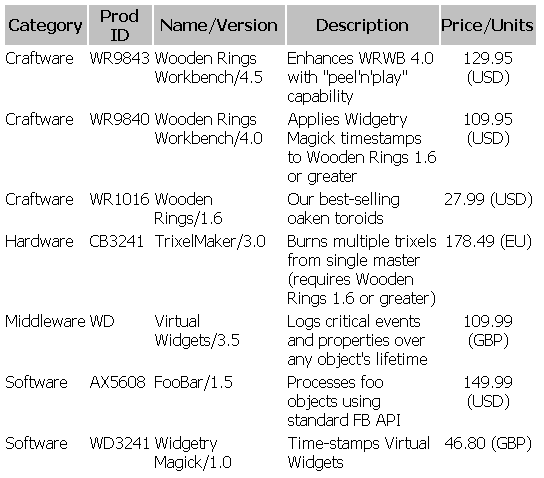
In this topic, we add a single <xsl:sort> element to the above unsorted example.
Each <product> element is processed by a separate product template rule. This rule is invoked as a result of the <xsl:apply-templates> element in the products template rule. Suppose you want to sort your products by category. To do so, add an <xsl:sort> element as a child of the <xsl:apply-templates> element in the products template rule.
Note The<xsl:apply-templates>element, which is typically empty, must be changed to a non-empty start tag/end tag pair. Also note that the value of the<xsl:sort>element'sselectattribute is relative to the context node established by the<xsl:apply-templates>element. It is not relative to the context node established by the<xsl:template>element'smatchattribute. Therefore,<xsl:sort select="product/categ"/>will not work correctly.
XML File (prodsort.xml)
Use prodsort.xml, in Sample XML Data File for XSLT Sorting. Change the href attribute to reference prodsort1.xsl.
XSLT File (prodsort1.xsl)
<?xml version='1.0'?>
<xsl:stylesheet version="1.0"
      xmlns:xsl="http://www.w3.org/1999/XSL/Transform">

<xsl:template match="/">
   <HTML>
      <HEAD>
         <TITLE>Wooden Rings and More!</TITLE>
         <STYLE type="text/css">
            th {background-color: silver;
               font-family: Tahoma,Verdana,Arial,sans-serif}
            td {background-color: white;
               font-family: Tahoma,Verdana,Arial,sans-serif}
         </STYLE>
      </HEAD>
      <BODY>
         <xsl:apply-templates/>
      </BODY>
   </HTML>
</xsl:template>

<xsl:template match="products">
    <TABLE width="75%">
        <tr>
            <th>Category</th>
            <th>Prod ID</th>
            <th>Name/Version</th>
            <th>Description</th>
            <th>Price/Units</th>
        </tr>
        <xsl:apply-templates>
            <xsl:sort select="categ"/>
        </xsl:apply-templates>
    </TABLE>
</xsl:template>

<xsl:template match="product">
   <tr>
      <td valign="top"><xsl:value-of select="categ"/></td>
      <td valign="top"><xsl:value-of select="@prodID"/></td>
      <td valign="top"><xsl:value-of select="concat(name, '/', version)"/></td>
      <td valign="top"><xsl:value-of select="descr"/></td>
      <td valign="top" align="center"><xsl:value-of select="concat(price, ' (', price/@curr, ')')"/></td>
   </tr>
</xsl:template>

</xsl:stylesheet>
Formatted Output