| Microsoft XML Core Services (MSXML) 5.0 for Microsoft Office - XSLT Developer's Guide |  |
| Microsoft XML Core Services (MSXML) 5.0 for Microsoft Office - XSLT Developer's Guide | |
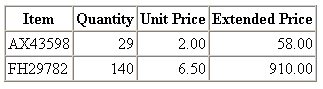
This example generates a table with a header row and one row of data for each item. In subsequent topics, we add sums to this table.
XML File (invoice.xml)
<?xml version='1.0'?>
<?xml-stylesheet type="text/xsl" href="inv.xsl" ?>
<invoice>
    <item item_num="AX43598">
        <quantity>29</quantity>
        <unit_price>2.00</unit_price>
    </item>
    <item item_num="FH29782">
        <quantity>140</quantity>
        <unit_price>6.50</unit_price>
    </item>
</invoice>
XSLT File (inv.xsl)
<?xml version='1.0'?>
<xsl:stylesheet version="1.0"
      xmlns:xsl="http://www.w3.org/1999/XSL/Transform">

<xsl:template match="/">
    <table border="1" cellpadding="2" cellspacing="0">
        <tr>
            <th>Item</th>
            <th>Quantity</th>
            <th>Unit Price</th>
            <th>Extended Price</th>
        </tr>
        <xsl:for-each select="invoice/item">
            <tr>
                <td>
                    <xsl:value-of select="@item_num"/>
                </td>
                <td align="right">
                    <xsl:value-of select="quantity"/></td>
                <td align="right">
                    <xsl:value-of select="format-number(unit_price, '#,##0.00')"/>
                </td>
                <td align="right">
                    <xsl:value-of select="format-number(quantity * unit_price, '#,##0.00')"/>
                </td>
            </tr>
        </xsl:for-each>
    </table>
</xsl:template>

</xsl:stylesheet>
Formatted Output